Concept vs. Specification: Why You’re Spending Too Much Time on Early-Stage Renders
Are you over-rendering too early in the project? Learn the difference between Concept Visualization and Specification, and save hours on every project.
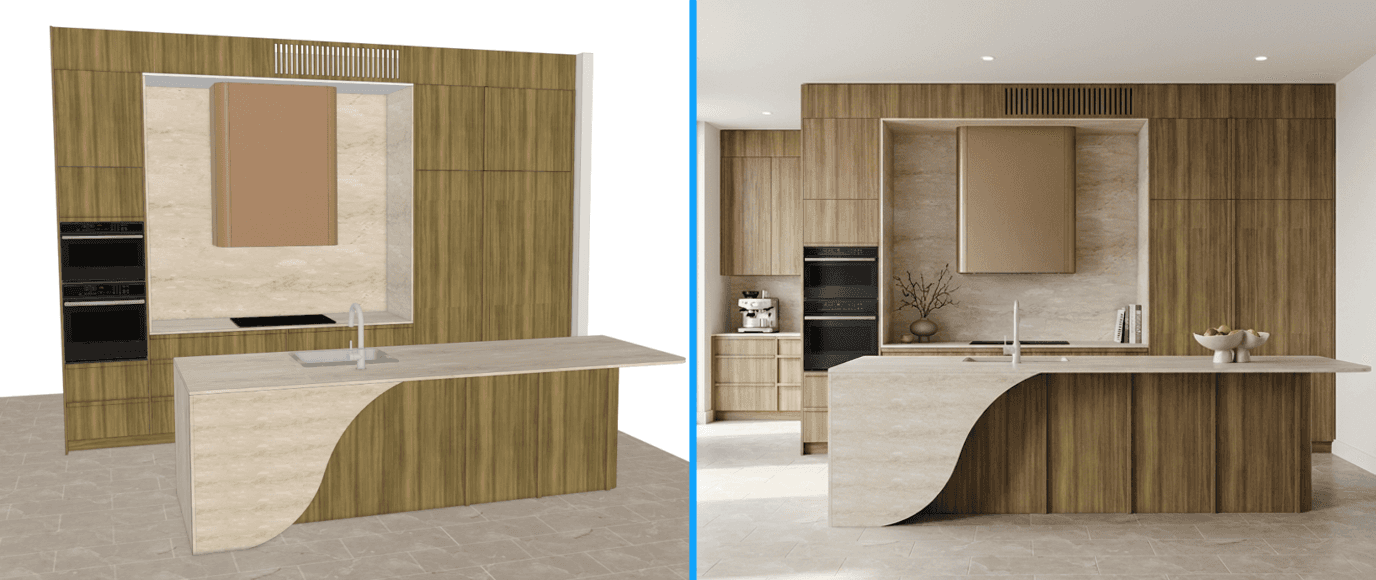
"I just can't picture it." Those five words are the most expensive sentence in the cabinet industry. When a client says this, they aren't saying "no." They are saying "I'm scared to commit $30,000 to something I can't see."
In the past, solving this meant hiring a designer or spending hours rendering a scene. But in a fast-paced market, speed is everything. If you take 3 days to send a render, your competitor has already met them, measured, and sent a quote.
The "Visual First" Sales Strategy: The most successful modern cabinet shops are flipping the script. Instead of saving the 3D render for the final sign-off, they are using it as the first hook.
Imagine this workflow:
You do a rough layout during the initial consult.
You take a screenshot.
Right there in the meeting (or on your phone in the truck), you generate a QuickCabRender visual.
You show the client: "Is this the vibe you're going for?"
The Psychology of the "Wow" Moment: When a client sees their own kitchen space transformed into a high-end photo, the conversation shifts. They stop haggling over the price of hinges and start falling in love with the finished product.
You aren't selling boxes anymore. You are selling a lifestyle.
Speed Wins: QuickCabRender was built for speed. We stripped away the complex engineering settings to focus purely on the visual "wow" factor. It’s not about millimeter-perfect accuracy (that’s what your CAD is for); it’s about capturing the feeling of the space instantly.
Don't let a lack of imagination kill your deal.
Create your first render in seconds.
← Back to Articles