Concept vs. Specification: Why You’re Spending Too Much Time on Early-Stage Renders
Are you over-rendering too early in the project? Learn the difference between Concept Visualization and Specification, and save hours on every project.
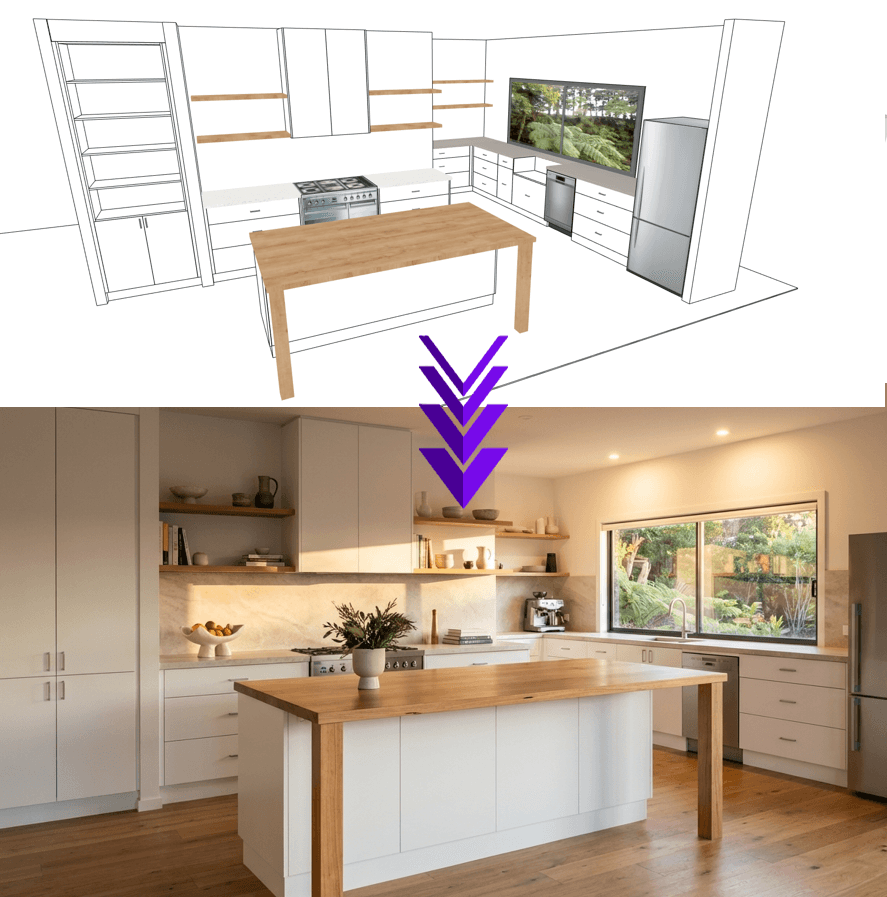
In an era of complex BIM software and CAD precision, the humble hand sketch is still one of the most powerful tools in an Interior Designer’s arsenal.
Whether you sketch on an iPad using Procreate or on a notepad during a site visit, the sketch captures the energy of a design in a way that rigid software sometimes misses.
But how do you present a sketch to a client who expects high-end polish?
From Napkin to Presentation - Historically, you would have to take that sketch, redraw it in CAD, 3D model it, and then render it. It’s a multi-hour process that kills the spontaneous creative flow.
New AI technology is now capable of interpreting the loose lines of a sketch and understanding context. It knows that a rectangle in a kitchen is likely an island bench, and squiggly lines above it are pendant lights.
The Workflow:
Sketch freely: Focus on layout and balance.
Upload to Quick Cab Render: The AI analyzes your lines.
Refine instantly: The tool generates a realistic interpretation of your sketch, complete with lighting and textures.
It preserves the soul of your design while giving it the professional polish needed for a client presentation. Keep sketching—just let technology handle the finishing touches.
Upload Your Sketch & See the Magic
← Back to Articles