Concept vs. Specification: Why You’re Spending Too Much Time on Early-Stage Renders
Are you over-rendering too early in the project? Learn the difference between Concept Visualization and Specification, and save hours on every project.
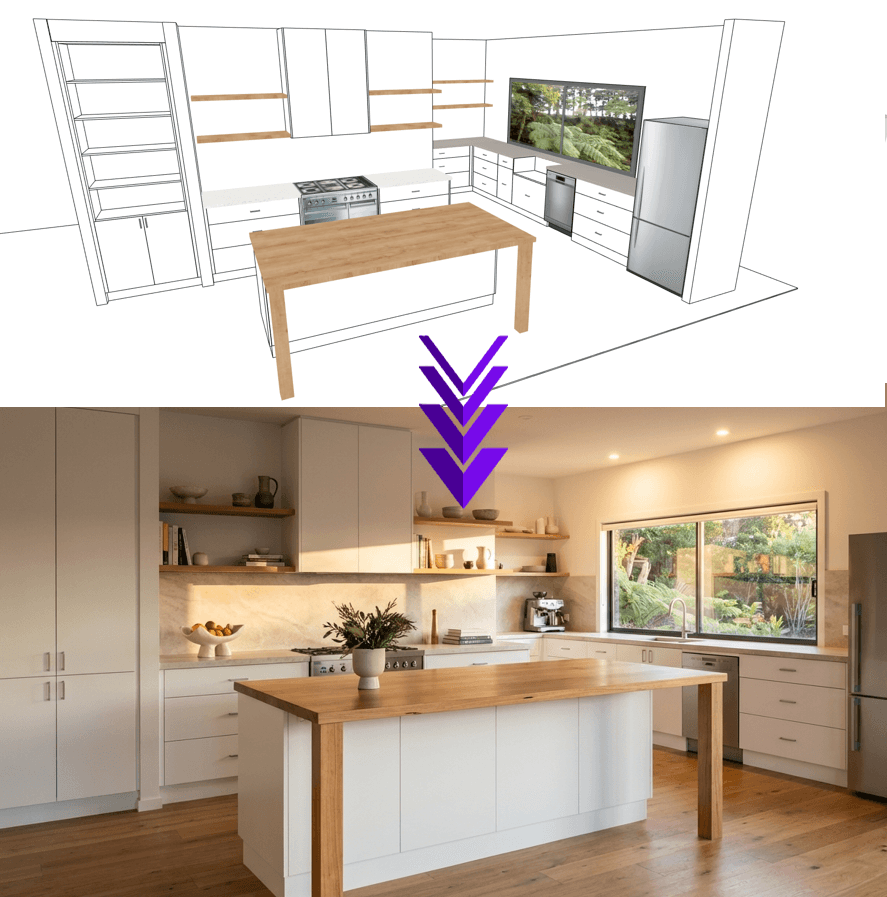
As interior designers, we all know the "Rendering Trap."
You’ve spent hours perfecting the layout in SketchUp or Revit. The flow is perfect, the cabinetry joinery is detailed, and the floor plan works. But now comes the painful part: The Render.
Traditionally, getting a client-ready image meant exporting to V-Ray, Enscape, or Lumion. It meant tweaking sun angles, adjusting material reflection maps, and waiting for your computer to process the image while you went to make coffee.
The Problem with the Old Workflow - In the early concept phase, you don't need "perfect specification." You need "perfect atmosphere." Spending 3 hours rendering a concept that the client might reject is a massive drain on your billable hours and creativity.
The AI Revolution: Concept over Configuration - This is where AI rendering tools like Quick Cab Render (QCR) are changing the game. Instead of calculating light physics manually, QCR uses advanced AI to interpret your line work and "paint" the materials, lighting, and shadows instantly.
How it works:
Screenshot your model: Take a simple view from SketchUp (or even a hand sketch).
Upload to QCR: No plugins or complex installation.
Get a Photorealistic Concept: In about 20 seconds, you have a high-end visualization to show your client.
It allows you to present 3 or 4 different material options in the time it used to take to set up one scene. Stop managing render settings and start designing.
Try Quick Cab Render for Free
← Back to Articles