API Documentation
API Documentation
API Documentation
Welcome to the QuickCabRender B2B API.
Our REST API allows you to programmatically generate photorealistic 4K renders from basic CAD wireframes and 3D screenshots.
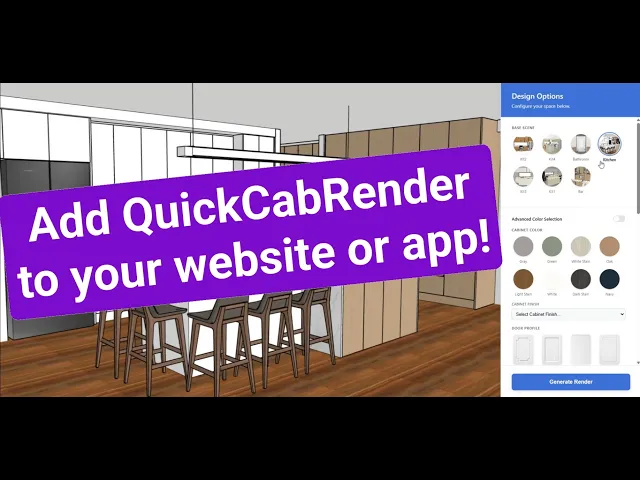
Watch the long form video here
Base URL & Authentication
Endpoint Base: https://api.quickcabrender.com
Content-Type:
application/jsonAuthentication: Authentication is handled directly inside the JSON payload. You must include your
client_idandapi_keyin every request to authorize the render and track your monthly credit usage. Both are available in your QCR Settings Dashboard.
Endpoint 1: Generate Standard Render
Method:
POSTPath:
/apiAction: Triggers the core rendering engine. (Cost: 1 Credit).
Request Payload (JSON)
{
"client_id": "your_client_id",
"api_key": "******",
"action": "render",
"source": "API",
"original_image_url": "https://example.com/path/to/your/cad-export.jpg",
"selections": {
"door_profile": "Shaker",
"door_finish": "Matte",
"countertop_finish": "Gloss",
"lighting": "LED strip lights under wall cabinets",
"decoration": "Minimal",
"time_of_day": "Daylight",
"room_type": "Kitchen",
"flooring": "White Oak"
}
}

Field Definitions
Authentication & Routing
client_id(String, Required): Your unique API account identifier provided in your QCR dashboard.api_key(String, Required): Your private API key for authentication.action(String, Required): Must be set to"render".source(String, Required): Identifies the origin of the request. For standard API integrations, this should be set to"API".original_image_url(String, Required): A publicly accessible URL to your source image. The engine will download the image from this link.⚠️ CRITICAL: The image must be a 3D perspective shot of cabinetry (e.g., a SketchUp export, Cabinet Vision 3D view, or 3D wireframe). Flat 2D elevations or floor plans will not work. See the QCR homepage for examples of ideal input images.
Selections Objects
The selections object provides the exact instructions to the rendering engine on how to texture and style the cabinetry geometry found in your source image.
door_profile(String, Required): The structural style to apply to the cabinet doors (e.g.,"Flat","Shaker","V-Groove").door_finish(String, Required): The physical finish of the cabinetry (e.g.,"Matte","Gloss","Satin").countertop_finish(String, Required): The material type or color for the benchtops (e.g.,"Matte","Gloss","Satin").room_type(String, Required): Defines the architectural context of the space (e.g.,"Kitchen","Bathroom","Laundry","Walk-in Wardrobe").flooring(String, Optional): The desired floor material (e.g.,"European Oak Timber","Polished Concrete","Terrazzo Tiles").time_of_day(String, Optional): Environmental lighting context (e.g.,"Daylight","Dusk","Evening").lighting(String, Optional): The interior lighting style (e.g.,"Warm LED under wall cabinets","Bright horizontal LED strip lighting in glass cabinets").decoration(String, Optional): The staging style for props and appliances. We recommend"Minimal"to keep benchtops relatively clear and focus on the cabinetry.
Response
The API processes requests synchronously. Expect response times between 30-50 seconds depending on the complexity of the 3D geometry.
Success Response (200 OK)
{
"success": true,
"image_url": "https://cdn.quickcabrender.com/renders/img_9A8B7C6D5E.jpg"
}
Endpoint 2: Upscale to 4K
Method:
POSTPath:
/api(Same endpoint, different action)Action: Pass the URL of a previously generated standard render to permanently upscale it to photorealistic 4K. (Cost: 1 Credit).
Request Payload (JSON)
{
"client_id": "your_client_id",
"api_key": "******",
"action": "upscale",
"source": "API",
"original_image_url": "https://example.com/path/to/your/rendered image.jpg"
}
Success Response (200 OK)
{
"success": true,
"image_url": "https://drive.google.com/thumbnail?sz=w3000&id=1abc2def3ghi"
}
Error Codes
400 Bad Request: Returned if the JSON payload is malformed or missing required fields.
403 Forbidden: Returned if the api_key is invalid, the client_id doesn't match, or you have exceeded your monthly render limit.
422 Unprocessable Entity: Returned if the original_image_url cannot be downloaded (e.g. hidden behind a password or broken link).
Rate Limits & Best Practices
Concurrency: Please limit concurrent requests to 3 simultaneous renders to prevent queue timeouts.
Image Preparation: The image must be a 3D perspective shot of cabinetry with basic textures turned on. Flat 2D elevations or black-and-white wireframes will fail.
Timeouts: Ensure your backend HTTP client is configured with a timeout of at least
60000ms(60 seconds) to accommodate AI generation time.
Enterprise Reliability & Support
QuickCabRender's API is built on auto-scaling cloud infrastructure designed for high-volume commercial use. For platforms embedding QCR at scale, we offer dedicated Service Level Agreements (SLAs), priority technical support, and uptime guarantees. Contact our partnership team to discuss an SLA tailored to your integration.
Go back
Welcome to the QuickCabRender B2B API.
Our REST API allows you to programmatically generate photorealistic 4K renders from basic CAD wireframes and 3D screenshots.
Watch the long form video here
Base URL & Authentication
Endpoint Base: https://api.quickcabrender.com
Content-Type:
application/jsonAuthentication: Authentication is handled directly inside the JSON payload. You must include your
client_idandapi_keyin every request to authorize the render and track your monthly credit usage. Both are available in your QCR Settings Dashboard.
Endpoint 1: Generate Standard Render
Method:
POSTPath:
/apiAction: Triggers the core rendering engine. (Cost: 1 Credit).
Request Payload (JSON)
{
"client_id": "your_client_id",
"api_key": "******",
"action": "render",
"source": "API",
"original_image_url": "https://example.com/path/to/your/cad-export.jpg",
"selections": {
"door_profile": "Shaker",
"door_finish": "Matte",
"countertop_finish": "Gloss",
"lighting": "LED strip lights under wall cabinets",
"decoration": "Minimal",
"time_of_day": "Daylight",
"room_type": "Kitchen",
"flooring": "White Oak"
}
}
Field Definitions
Authentication & Routing
client_id(String, Required): Your unique API account identifier provided in your QCR dashboard.api_key(String, Required): Your private API key for authentication.action(String, Required): Must be set to"render".source(String, Required): Identifies the origin of the request. For standard API integrations, this should be set to"API".original_image_url(String, Required): A publicly accessible URL to your source image. The engine will download the image from this link.⚠️ CRITICAL: The image must be a 3D perspective shot of cabinetry (e.g., a SketchUp export, Cabinet Vision 3D view, or 3D wireframe). Flat 2D elevations or floor plans will not work. See the QCR homepage for examples of ideal input images.
Selections Objects
The selections object provides the exact instructions to the rendering engine on how to texture and style the cabinetry geometry found in your source image.
door_profile(String, Required): The structural style to apply to the cabinet doors (e.g.,"Flat","Shaker","V-Groove").door_finish(String, Required): The physical finish of the cabinetry (e.g.,"Matte","Gloss","Satin").countertop_finish(String, Required): The material type or color for the benchtops (e.g.,"Matte","Gloss","Satin").room_type(String, Required): Defines the architectural context of the space (e.g.,"Kitchen","Bathroom","Laundry","Walk-in Wardrobe").flooring(String, Optional): The desired floor material (e.g.,"European Oak Timber","Polished Concrete","Terrazzo Tiles").time_of_day(String, Optional): Environmental lighting context (e.g.,"Daylight","Dusk","Evening").lighting(String, Optional): The interior lighting style (e.g.,"Warm LED under wall cabinets","Bright horizontal LED strip lighting in glass cabinets").decoration(String, Optional): The staging style for props and appliances. We recommend"Minimal"to keep benchtops relatively clear and focus on the cabinetry.
Response
The API processes requests synchronously. Expect response times between 30-50 seconds depending on the complexity of the 3D geometry.
Success Response (200 OK)
{
"success": true,
"image_url": "https://cdn.quickcabrender.com/renders/img_9A8B7C6D5E.jpg"
}
Endpoint 2: Upscale to 4K
Method:
POSTPath:
/api(Same endpoint, different action)Action: Pass the URL of a previously generated standard render to permanently upscale it to photorealistic 4K. (Cost: 1 Credit).
Request Payload (JSON)
{
"client_id": "your_client_id",
"api_key": "******",
"action": "upscale",
"source": "API",
"original_image_url": "https://example.com/path/to/your/rendered image.jpg"
}
Success Response (200 OK)
{
“client_id”: “YOUR_CLIENT_ID”,
“image_url”: “https://drive.google.com/thumbnail?sz=w3000&id=1abc2def3ghi”
}
Error Codes
400 Bad Request: Returned if the JSON payload is malformed or missing required fields.
403 Forbidden: Returned if the api_key is invalid, the client_id doesn’t match, or you have exceeded your monthly render limit.
422 Unprocessable Entity: Returned if the original_image_url cannot be downloaded (e.g. hidden behind a password or broken link).
Rate Limits & Best Practices
Concurrency: Please limit concurrent requests to 3 simultaneous renders to prevent queue timeouts.
Image Preparation: The image must be a 3D perspective shot of cabinetry with basic textures turned on. Flat 2D elevations or black-and-white wireframes will fail.
Timeouts: Ensure your backend HTTP client is configured with a timeout of at least
60000ms(60 seconds) to accommodate AI generation time.
Enterprise Reliability & Support
QuickCabRender's API is built on auto-scaling cloud infrastructure designed for high-volume commercial use. For platforms embedding QCR at scale, we offer dedicated Service Level Agreements (SLAs), priority technical support, and uptime guarantees. Contact our partnership team to discuss an SLA tailored to your integration.
Go back
Welcome to the QuickCabRender B2B API.
Our REST API allows you to programmatically generate photorealistic 4K renders from basic CAD wireframes and 3D screenshots.
Watch the long form video here
Base URL & Authentication
Endpoint Base: https://api.quickcabrender.com
Content-Type:
application/jsonAuthentication: Authentication is handled directly inside the JSON payload. You must include your
client_idandapi_keyin every request to authorize the render and track your monthly credit usage. Both are available in your QCR Settings Dashboard.
Endpoint 1: Generate Standard Render
Method:
POSTPath:
/apiAction: Triggers the core rendering engine. (Cost: 1 Credit).
Request Payload (JSON)
{
"client_id": "your_client_id",
"api_key": "******",
"action": "render",
"source": "API",
"original_image_url": "https://example.com/path/to/your/cad-export.jpg",
"selections": {
"door_profile": "Shaker",
"door_finish": "Matte",
"countertop_finish": "Gloss",
"lighting": "LED strip lights under wall cabinets",
"decoration": "Minimal",
"time_of_day": "Daylight",
"room_type": "Kitchen",
"flooring": "White Oak"
}
}
Field Definitions
Authentication & Routing
client_id(String, Required): Your unique API account identifier provided in your QCR dashboard.api_key(String, Required): Your private API key for authentication.action(String, Required): Must be set to"render".source(String, Required): Identifies the origin of the request. For standard API integrations, this should be set to"API".original_image_url(String, Required): A publicly accessible URL to your source image. The engine will download the image from this link.⚠️ CRITICAL: The image must be a 3D perspective shot of cabinetry (e.g., a SketchUp export, Cabinet Vision 3D view, or 3D wireframe). Flat 2D elevations or floor plans will not work. See the QCR homepage for examples of ideal input images.
Selections Objects
The selections object provides the exact instructions to the rendering engine on how to texture and style the cabinetry geometry found in your source image.
door_profile(String, Required): The structural style to apply to the cabinet doors (e.g.,"Flat","Shaker","V-Groove").door_finish(String, Required): The physical finish of the cabinetry (e.g.,"Matte","Gloss","Satin").countertop_finish(String, Required): The material type or color for the benchtops (e.g.,"Matte","Gloss","Satin").room_type(String, Required): Defines the architectural context of the space (e.g.,"Kitchen","Bathroom","Laundry","Walk-in Wardrobe").flooring(String, Optional): The desired floor material (e.g.,"European Oak Timber","Polished Concrete","Terrazzo Tiles").time_of_day(String, Optional): Environmental lighting context (e.g.,"Daylight","Dusk","Evening").lighting(String, Optional): The interior lighting style (e.g.,"Warm LED under wall cabinets","Bright horizontal LED strip lighting in glass cabinets").decoration(String, Optional): The staging style for props and appliances. We recommend"Minimal"to keep benchtops relatively clear and focus on the cabinetry.
Response
The API processes requests synchronously. Expect response times between 30-50 seconds depending on the complexity of the 3D geometry.
Success Response (200 OK)
{
"success": true,
"image_url": "https://cdn.quickcabrender.com/renders/img_9A8B7C6D5E.jpg"
}
Endpoint 2: Upscale to 4K
Method:
POSTPath:
/api(Same endpoint, different action)Action: Pass the URL of a previously generated standard render to permanently upscale it to photorealistic 4K. (Cost: 1 Credit).
Request Payload (JSON)
{
"client_id": "your_client_id",
"api_key": "******",
"action": "upscale",
"source": "API",
"original_image_url": "https://example.com/path/to/your/rendered image.jpg"
}
Success Response (200 OK)
{
“client_id”: “YOUR_CLIENT_ID”,
“image_url”: “https://drive.google.com/thumbnail?sz=w3000&id=1abc2def3ghi”
}
Error Codes
400 Bad Request: Returned if the JSON payload is malformed or missing required fields.
403 Forbidden: Returned if the api_key is invalid, the client_id doesn’t match, or you have exceeded your monthly render limit.
422 Unprocessable Entity: Returned if the original_image_url cannot be downloaded (e.g. hidden behind a password or broken link).
Rate Limits & Best Practices
Concurrency: Please limit concurrent requests to 3 simultaneous renders to prevent queue timeouts.
Image Preparation: The image must be a 3D perspective shot of cabinetry with basic textures turned on. Flat 2D elevations or black-and-white wireframes will fail.
Timeouts: Ensure your backend HTTP client is configured with a timeout of at least
60000ms(60 seconds) to accommodate AI generation time.
Enterprise Reliability & Support
QuickCabRender's API is built on auto-scaling cloud infrastructure designed for high-volume commercial use. For platforms embedding QCR at scale, we offer dedicated Service Level Agreements (SLAs), priority technical support, and uptime guarantees. Contact our partnership team to discuss an SLA tailored to your integration.
Go back